
Below, you will find answers to some of the most frequently asked questions.
- Where can I find required actions?
- Should corrections be performed directly in Connect ID?
- How do I validate that the issue has been resolved?
- What do different validation results mean?
- What is the “Primary” FIFA ID?
- How should I understand the “Check if your listener is responding with details” action?
- What if the merge was already performed by another Member Association?
- What should I do if the player is currently active in my Member Association?
- Why is DXP unable to determine if a registration should be added to the Primary FIFA ID?
- What if I am unsure how to perform the required correction?
- Useful Resources
Where can I find required actions?
Each DXP case contains a Data Fixing section describing the required corrective actions.
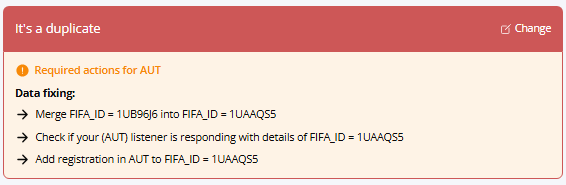
Typical actions include:
- merging FIFA IDs
- reusing the correct (Primary) FIFA ID
- correcting registrations or person details in your NRS
- pushing the latest active registration to Connect ID
Should corrections be performed directly in Connect ID?
No — in most cases, corrections should be performed in your own National Registration System (NRS), which should then synchronise the changes to Connect ID.
Connect ID should not be treated as the primary operational system for player management.
How do I validate that the issue has been resolved?
After completing the required corrections in your NRS, open the DXP ticket and click:

DXP will then verify whether the required changes are visible in Connect ID.
What do different validation results mean?
- ✅ action completed,
- ❌ action not completed yet,
- ⚠️ DXP cannot determine the next step automatically and FIFA may need to review the case. Use the "Escalate to FIFA" option hidden behind the menu
What is the “Primary” FIFA ID?
The Primary FIFA ID is the FIFA ID that should continue to be used after duplicate records are merged.
After a merge:
- your system must stop using the secondary FIFA ID
- all future registrations and operations should use the Primary FIFA ID only
How should I understand the “Check if your listener is responding with details” action?
One of the possible data fixing actions is:
Check if your listener is responding with details of FIFA ID = [Primary FIFA ID]
This action verifies whether your National Registration System (NRS), through its Connect ID listener, can provide player details for the Primary FIFA ID.
This step is especially important after a merge. When a Secondary FIFA ID is merged into a Primary FIFA ID, all systems that previously used the Secondary FIFA ID should stop using it and start using the Primary FIFA ID instead.
For example:
- Secondary FIFA ID = 1AAL631
- Primary FIFA ID = 12DU8C1
After the merge, your NRS should use FIFA ID = 12DU8C1 for this player. If your NRS still uses FIFA ID = 1AAL631, your listener may not be able to return player details when DXP asks for FIFA ID = 12DU8C1. In such a situation, this data fixing action will remain incomplete.
What should you check?
- Verify in your NRS whether the player is now linked to the Primary FIFA ID.
- Once the correction is made in your NRS, return to DXP and click Validate data fixing.
If the listener responds correctly with details for the Primary FIFA ID, this action should be marked as completed.
What if the merge was already performed by another Member Association?
In most cases, the Member Association that owns the Secondary FIFA ID is expected to perform the merge. However, in some cases, the merge may already have been performed by another Member Association or by FIFA.
If DXP shows the merge action as completed, you do not need to perform the merge again.
To verify who performed the merge:
- Open the DXP ticket.
- Click the icon...
 …next to the relevant FIFA ID to open the record in the FIFA Connect ID Admin Console / Audit Trail.
 - Check the latest operation performed on the Secondary FIFA ID.
If the Audit Trail confirms that the Secondary FIFA ID has already been merged into the Primary FIFA ID by another party, you should focus on the remaining data fixing actions.
In particular, make sure that your NRS is now using the Primary FIFA ID. After a merge, all systems that previously used the Secondary FIFA ID should replace it with the Primary FIFA ID. Note that if it was another party who merged the record, you should have received a notification on that from the address: notifications@id.ma.services. All TMS Managers of all MAs are subscribed to these notifications and need to act on them so that their system stays up to date with the latest changes to FIFA IDs. More information on the notification may be found in the article Connect ID Notifications.
What should I do if the player is currently active in my Member Association?
If the player is currently active in your MA, your system should push the latest active registration to Connect ID. In a DXP ticket in such scenario you should see a third data action: Add registration in Your MA to FIFA ID = 1234567 (this is always a Primary FIFA ID).
This is important because:
- the latest active registration determines the Data Owner
- active registrations are used by FIFA systems and business processes
Why is DXP unable to determine if a registration should be added to the Primary FIFA ID?
In some duplicate cases, DXP may show a warning similar to the following:
Unable to determine if a registration should be added to the primary record. Inactive registration(s) is missing a ValidTo date for FIFA ID = [FIFA ID] (person details). Escalate to FIFA when other steps are completed.
This warning is related to the Data Ownership of the Primary FIFA ID.
In Connect ID, the Data Owner of a player record is determined based on the registration data stored for that FIFA ID. In practice, adding a registration to a FIFA ID is also the way in which a Member Association becomes the Data Owner of that FIFA ID.
Therefore, when DXP checks whether a registration should be added to the Primary FIFA ID, it is effectively checking whether the current Data Owner of the Primary FIFA ID is correct, or whether Data Ownership should be moved to another Member Association by adding that association’s registration.
In general:
- if the player is currently active in a Member Association, that Member Association should normally be the Data Owner;
- if the player is no longer active, the Data Owner should normally be the Member Association where the player was registered most recently.
DXP calculates this by analysing the registration history returned by the systems involved in the ticket. Based on this history, DXP decides whether the current Data Owner of the Primary FIFA ID is correct or whether another Member Association should add a registration and become the Data Owner.
Why can this calculation fail?
One possible reason is incomplete registration history.
For example, if a system returns an inactive registration, the registration should include a ValidTo date. The ValidTo date tells DXP when the registration ended.
If an inactive registration does not contain a ValidTo date, DXP cannot reliably determine when the player last belonged to that Member Association. As a result, DXP cannot decide whether the current Data Owner of the Primary FIFA ID is correct or whether another Member Association should add a registration and become the new Data Owner.
What should I check?
If you see this warning, please verify the registration history in your NRS and in the response returned by your listener.
In particular, check that:
- inactive registrations include a ValidTo date;
- active registrations do not incorrectly appear as inactive;
- after a merge, your NRS uses the Primary FIFA ID and not the Secondary FIFA ID;
- the registration history is correctly linked to the Primary FIFA ID in your NRS.
If the player is currently active in your Member Association, your system should add the relevant active registration on the Primary FIFA ID (note that the merge operation does not do it automatically). This will make your Member Association the Data Owner of that FIFA ID.
If the player is no longer active in your Member Association, but your association was the last one where the player was registered, your system should still add the relevant inactive registration to the Primary FIFA ID.
Once the registration history has been corrected in your NRS and synchronised with Connect ID, return to DXP and click Validate data fixing again.
If DXP still cannot determine the required registration action after the registration history is corrected, please escalate the ticket to FIFA directly in DXP. To do this, open the DXP ticket, click the three dots menu in the top-right corner of the ticket page, and select Escalate to FIFA.
What if I am unsure how to perform the required correction?
Please contact:
- your internal development team or system provider for NRS implementation details
- FIFA Connect Platform support for NRS operational guidance
- FIFA Connect ID support for DXP or Connect ID-specific questions
You can also review our technical resources available in the support portal and the SDK documentation.
Useful Resources
For additional assistance, please contact: support.id@fifa.org
go back to the step-by-step guide.